
Share this: Google+
Symmetric Matrix using Excel
Suppose we have a integer matrix
 , to get symmetric matrix
 from
from
 , we multiply matrix
 by its transpose:
 or
or
 . Here is how to do it in Excel.
You may download the spreadsheet example here
. Here is how to do it in Excel.
You may download the spreadsheet example here
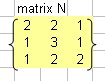
- Type any matrix 3 by 3. Suppose our matrix is like this figure on the right
- Note that optionally you can give name to the matrix using menu Insert-Name-Define matrix_N , then press OK button.
- In other cell, type =TRANSPOSE( matrix_N ), where the array is the 3 by 3 matrix N. Then press enter key.
-
Don't worry about the result yet. Starting from the cell with Transpose formula, highlight 3 by 3 cells. Press F2, and it will be appear like the following figure
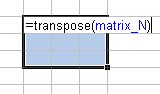 . Then press CTRL-SHIFT-ENTER together. You get the transpose matrix
 . Optionally you may give name
matrix_N1
to the transpose matrix by using procedure in step 2 above.
. Optionally you may give name
matrix_N1
to the transpose matrix by using procedure in step 2 above.
-
Now you can get the symmetric matrix by multiplying multiply matrix
 by its transpose. In a new empty cell type = MMULT(matrix_N1, matrix_N) and then press enter key.
-
Starting with the cell with MMult formula, highlight 3 by 3 cells. Press F2, and it will be appear like the following figure
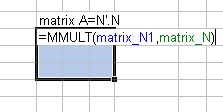 Then press CTRL-SHIFT-ENTER together you get the symmetric matrix
 as shown in the figure below
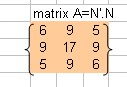
The spreadsheet example of this tutorial can be downloaded here
.
See also:
Goal Seek Tutorial
,
MS Excel Tutorial index
,
Kardi Teknomo's Tutorial
,
Interactive program on Symmetric Matrix
Send your comments, questions and
suggestions
This tutorial is copyrighted .
Preferable reference for this tutorial is
Teknomo, Kardi (2015) How do we get symmetric matrix ?. https:\\people.revoledu.com\kardi\ tutorial\Excel\SymmetricMatrix.html