
<
Previous
|
Next
|
VB Tutorial
|
Contents
>
Visual Basic (VB) Simple Game
In this section of VB tutorial, we will make a very simple trivia game. The goal is to put the ball between two text boxes. You may
download the code in here
. Alternatively, you may perform the following steps:
1. Open new VB
Standard Exe
project
2. Drag and drop 2
text box
es, and 5
command button
s
3. Name the command buttons:
cmdStart
,
cmdBall
,
cmdLeft
,
cmdRight
and
cmdQuit
.
4. Change the
Caption
property of the command buttons
5. Change the
BackColor
property of the text boxes with any color you like
6. Arrange the place and resize the text boxes and command button like the figure below
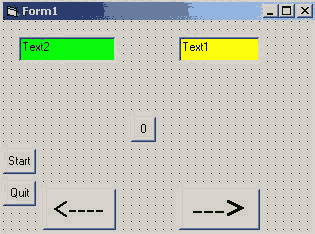
7. Copy and paste the following code in the respective command button:
Private Sub cmdBall_Click()
cmdBall.Top = cmdBall.Top - 200
cmdBall.Left = cmdBall.Left - 300 * Rnd + 600
End SubPrivate Sub cmdLeft_Click()
cmdBall.Left = cmdBall.Left - 200
txtLeft.Text = Val(txtLeft.Text) + 1
End SubPrivate Sub cmdQuit_Click()
End
End Sub
Private Sub cmdRight_Click()
cmdBall.Left = cmdBall.Left + 200
txtRight.Text = Val(txtRight.Text) + 1
End SubPrivate Sub cmdStart_Click()
cmdBall.Left = Rnd * Me.Width
cmdBall.Top = Rnd * Me.Height
End Sub
Now you can run the program (F5). Do you understand how it is work?
Rnd
= random number
End
= to quit the program
Val
= to change text to value (or number)
Notice
Top
,
left
,
width
,
height
property values
<
Previous
|
Next
|
VB Tutorial
|
Contents
>
Rate this tutorial or give your comments about this tutorial