
<
Previous
|
Next
|
VB Tutorial
|
Contents
>
Input and Output in Visual Basic (VB)
The simplest visual input and output in Visual basic is using InputBox and MessageBox . Now you will make a simple project to see how this work.
1. Drag a
Command Button
 into Form
2. Click the command button and change the
caption
property into click me
3. Double click the command button and type
Dim myName
myName = InputBox("input name")
MsgBox "Hello " & myName
4. Run the program and input your name, see what happen?
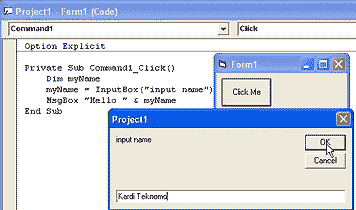
Notice the tips when you type ( after InputBox and space after the MsgBox. Thats is called
Intellisense
.

You have seen how easy is to program in Visual Basic. You dont even need to memorize what are the parameters of your command.
Dim
= to declare your variable name
myName
<
Previous
|
Next
|
VB Tutorial
|
Contents
>
Rate this tutorial or give your comments about this tutorial