
<
Previous
|
Next
|
VB Tutorial
|
Contents
>
Create Your Own VB Function
As example of function procedure, now you will make a simple function to compute hypotenuse of a right triangle that is the longest side of triangle facing the perpendicular angle.
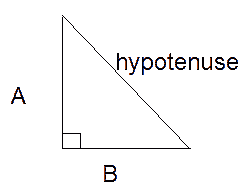
Start making a new standard Exe project. Put one label and two text boxes in the form and one command button and change the Text property of the 2 textboxes into any numbers. Then copy and paste the function code below in the declaration section of your form or standard module.
 Function Hypotenuse (A As Integer, B As Integer) As String
       Hypotenuse = Sqr(A ^ 2 + B ^ 2)
 End Function
Private Sub Command1_Click() Label1.Caption = Hypotenuse = & Hypotenuse(CInt(Text1.Text), CInt(Text2.Text)) End Sub
Run the program, fill the two text box with numbers and click the command button. In the example above the function Hypotenuse take two integer arguments A and B and then return the computation value (by repeating the name of the function) to the caller. In this case the caller is Command1_Click event procedure. Then, the caller put the return value into label
Note: You call a Function procedure the same way you call any of the built-in functions in VB
<
Previous
|
Next
|
VB Tutorial
|
Contents
>
Rate this tutorial or give your comments about this tutorial